If a delivery billed in a prior month was entered with the wrong price, correct it by issuing a credit for the original invoice and rebilling at the correct price. Do not change the gallons—the delivery was correct. Only the price is being adjusted.
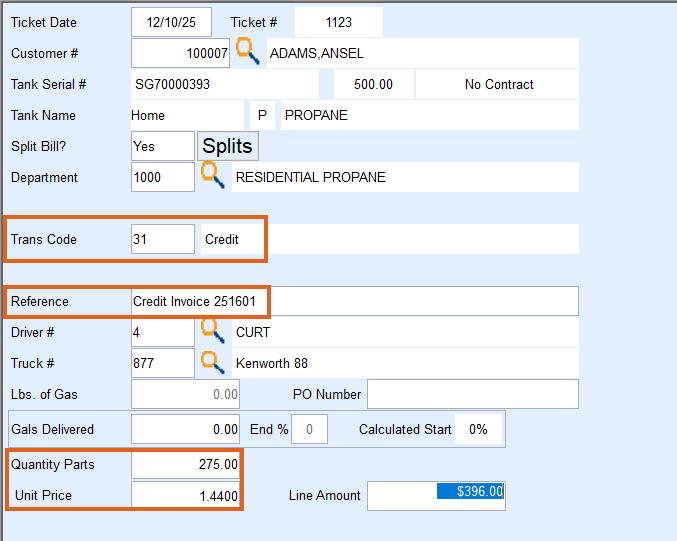
Credit Invoice
- In Sales Journal, use today’s date as the correction date.
- Set Trans Code to 31 (Credit).
- In Reference, enter Credit Invoice XXXXX (This format is recommended for easier tracking).
- Enter the original delivered gallons in Quantity Parts.
- Enter the original delivered price in Unit Price.
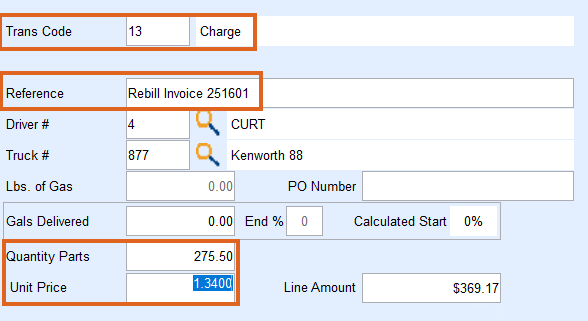
Rebill Invoice
- In Sales Journal, use today’s date as the correction date.
- Set Trans Code to 13 (Charge).
- In Reference, enter Rebill Invoice XXXXX or Price Correction Invoice XXXXX.
- Enter the original delivered gallons in Quantity Parts.
- Enter the correct price in Unit Price.
Sample view of customer’s History showing a rebill and credit.
