Energy Force
- SKYR-58 / Purchase Order Number Field on Call-in Screen – A Purchase Order number can be entered in the PO Number field on the Call-in screen and will carry through to manual sales posting and EnergyTrack. When a tank has a standing PO number, the PO Number field on the Call-in screen will populate but can be changed and updated for the Call-in delivery.
Note: The PO number on the Call-in screen will only apply to the delivery against the call-in and will not change the standing PO Number on the Customers Tank.
- SKYR-792 / Automated Tank Import to Agvance – Mutual Energy Force and Agvance customers can automatically import tanks without running the export/import processes. Read more!
- SKYR-909 / Julian Schedule Auto Tasks – Julian schedule with Start Date, Delivery Date and Date Posted the same will not lock up the posting routine in Manual Sales Entry or Post Re-engineered EnergyTrack.
- SKYR-959 / GPS Coordinates – GPS Tank Coordinates tab on the Tank Info screen continues to display coordinates when the tank Type has been modified.
- SKYR-1072 / Split Modification – Modifying a split updates the Last Modified Date for a tank as expected.
- SKYR-64 / Additional Fields on Safety Forms – Safety Forms now include Customer Type, Delivery Type and Co Owns when printed. Also, a Description field has been added when the Entry Method of Other is selected, this new field displays on the printed form as well.
- SKYR-829 / Attaching Images in EnergyImage – Energy-Image captures the correct image when multiple users are attaching images at the same time.
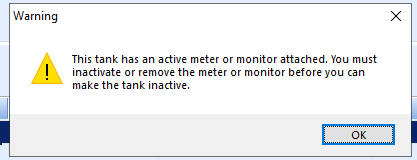
- SKYR-867 / Monitor Warning on Tank Transfer – Transferring, inactivating or picking up tanks will display a notification if there is an active monitor\meter attached, eliminating monitors or meters left on inactive tanks.
Company owned tanks will receive this message if CT (Customer Transfer action) or PU (Pick Up) is selected under Change Inv Status. Selecting Yes to transfer an attached monitor once the pickup or transfer of the tank is complete displays the Change Inventory Status box for the monitor or meter. When No is selected the Change Tank Inventory Status box will close.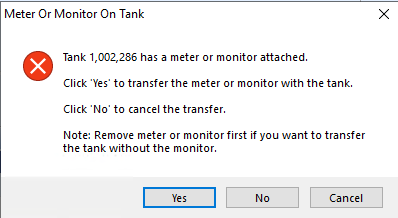 Customer owned tanks will display this message to let them know that the monitor or meter needs to be removed before inactivating or transferring the tank.
- SKYR-1052 / Daily Tank Export – Daily Tank Export will now only export new modified tanks and no longer asks users if they wish to export all tanks or only new and modified tanks. If there is a need to export all tanks, the Last Run Date log entry for TankExp can be removed and then all tanks will export.
- SKYR-1075 / Additional Tank Details on Tank Export – State, Zip Code and GPS Tank Coordinates have been added to the Tank Export and Import Process.
- SKYR-908 / Department Lookup – Lookup function for Department in Billing Entry for Recurring Billing works as expected.
- Why – The available Department lists were not displaying as expected.
- When/Where – The Department list opens for selecting the Recurring Billing / Billing Entry Department by selecting F5, the magnifying glass, or double clicking.
- Action needed – No action required.
- SKYR-1129 / Energy Force Main Menu Logo – Energy Force logo at Main Menu has been updated.
- Action needed – No action required.
- SKYR-1130 / Energy Force Tank Export to Agvance (Setting Rent Details) – The Daily Tank Export from Energy Force will now update the Rent/Lease type in Agvance based on the following criteria within Energy Force:
- If Company Owned tank and Tank Rent = Y and Lease to Own is checked set to Lease.
- If Company Owned tank and Tank Rent = Y and Lease to Own is not checked set to Rent.
- If Customer Owned tank set to Owned.
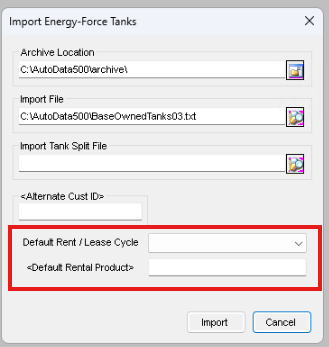
The Default Rent / Lease Cycle and <Default Rental Product> need to be populated by the default values that can be set upon the import of a tank file. Customer should be on the Agvance 7.0.29320 release.
- Why – Align tank ownership between Agvance and Energy Force.
- When/Where – Exporting tanks from Energy Force to Agvance.
- Action needed – The Default Rent / Lease Cycle and <Default Rental Product> need to be populated as stated above and the Customer should be on the Agvance 7.0.29320 release or contact support@agvance.net for assistance.
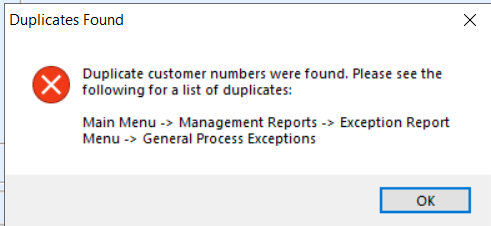
- SKYR-1132 / Customer Import Error Leading 0's on Customer Number – Leading zeros are dropped when importing customers into Energy Force causing a duplicates error message to display. Customers will not import, and the Last Run Date log will not be updated. The duplicate customers will be listed in the Full Exception box on the General Process Exceptions report at Management Reports / Exception Report Menu. For more information see Import Customer Process.
- Why – Agvance allows the entry of leading zeros seen as two different Customer ID’s. However, when transferring Customers to Energy Force, Customer Number is a number field and the leading zeros were trimmed off. This caused an error in the sync due to a duplicate Customer Number.
- When/Where – When running the Customer Sync, an Error Message will display identifying duplicates have been found.
- Action Needed – If the error message displays, review the General Process Exception report to resolve any duplicates otherwise no further action is needed as the import works as expected.
- SKYR-1037 / Agvance Preference Page – Settings for Customer Sync and Tank Import Sync for Agvance have been moved from System Settings to Supervisor Menu / Set Up Options / Agvance Setup Menu. The API Settings are also in the new menu. Settings are copied from the System Settings, placed in the new location and deleted from the old location. If the database did not have a particular setting in the System Settings, it will be created in the Agvance Preferences table and set with the default value. The user role for the API Settings has been updated from Allow_AgvApiSetup to Allow_AgvSetup. The user role applies to the Agvance Setup Menu which includes both the API Settings and the Agvance Preferences.
- Why – To have a place where all of the Agvance Settings and Preferences are in one place.
- When/Where – Using the Customer and Tank Sync between Energy Force and Agvance.
- Action needed– No action required. Settings will be transferred automatically.
 Customer owned tanks will display this message to let them know that the monitor or meter needs to be removed before inactivating or transferring the tank.
EnergyTrack
- SKYR-1022 / Non-Pumpable Price Entry – Price can be updated from $0.00 on Non-Pumpable products when the option to allow driver to change a price is No.
- SKYR-702 / Cylinder Load/Unload Trip Report – Cylinder quantities are correct on trip report regardless of how many copies are printed.
- SKYR-931 / Invoice Text Override System Setting – A new auto generated system setting Category of Invoice and Setting Name of InvoiceTextOverride has been added and defaults to N. This setting changes the wording on delivery documents from Invoice to Ticket. When deliveries are imported to Agvance a new invoice number is assigned to the sale, this change will help clarify to customers that it is not the Invoice number.
- SKYR-1073 / Adding Items on Invoice with a Split – Adding an item to an Energy Track ticket with a split tank does not clear out the price on the fuel delivery.
- SKYR-1153 / Autotask Lockup During Downloads – Zip files for Energy Track are now copied from the TLOUT folder to the Archive folder and then the original file is deleted from the TLOUT folder instead of moving the file. This will alleviate issues if the zip file is locked and can’t be deleted, an entry will be placed in the communicationerrors.log in the C:CTLS93 / DD85 folder stating that the file was locked and unable to be deleted.
- Action needed – No action required.