Energy Force
- SKYR-908 / Department Lookup – Lookup function for Department in Billing Entry for Recurring Billing works as expected.
- Why – The available Department lists were not displaying as expected.
- When/Where – The Department list opens for selecting the Recurring Billing / Billing Entry Department by selecting F5, the magnifying glass, or double clicking.
- Action needed – No action required.
- SKYR-1129 / Energy Force Main Menu Logo – Energy Force logo at Main Menu has been updated.
- Action needed – No action required.
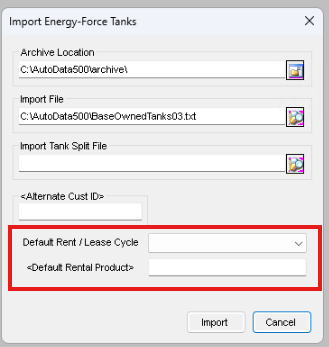
- SKYR-1130 / Energy Force Tank Export to Agvance (Setting Rent Details) – The Daily Tank Export from Energy Force will now update the Rent/Lease type in Agvance based on the following criteria within Energy Force:
- If Company Owned tank and Tank Rent = Y and Lease to Own is checked set to Lease.
- If Company Owned tank and Tank Rent = Y and Lease to Own is not checked set to Rent.
- If Customer Owned tank set to Owned.
The Default Rent / Lease Cycle and <Default Rental Product> need to be populated by the default values that can be set upon the import of a tank file. Customer should be on the Agvance 7.0.29320 release.
- Why – Align tank ownership between Agvance and Energy Force.
- When/Where – Exporting tanks from Energy Force to Agvance.
- Action needed – The Default Rent / Lease Cycle and <Default Rental Product> need to be populated as stated above and the Customer should be on the Agvance 7.0.29320 release or contact support@agvance.net for assistance.
- SKYR-1132 / Customer Import Error Leading 0's on Customer Number – Leading zeros are dropped when importing customers into Energy Force causing a duplicates error message to display. Customers will not import, and the Last Run Date log will not be updated. The duplicate customers will be listed in the Full Exception box on the General Process Exceptions report at Management Reports / Exception Report Menu. For more information see Import Customer Process.
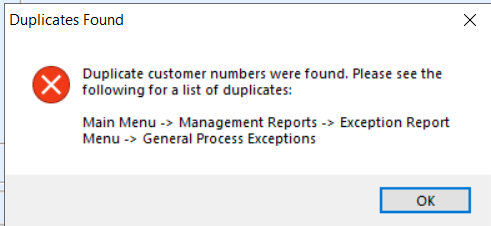
- Why – Agvance allows the entry of leading zeros seen as two different Customer ID’s. However, when transferring Customers to Energy Force, Customer Number is a number field and the leading zeros were trimmed off. This caused an error in the sync due to a duplicate Customer Number.
- When/Where – When running the Customer Sync, an Error Message will display identifying duplicates have been found.
- Action Needed – If the error message displays, review the General Process Exception report to resolve any duplicates otherwise no further action is needed as the import works as expected.
