Energy Force
- SKYR-499 / Journals Not in Master Clear File – Journals can only be accessed by one user\session at a time. If a second user\session attempts to select a journal that is already open then a message will be given stating the user who is already accessing the journal. Also, the full user name will be logged in the Journals Open table instead of just the first 4 characters.
- Why – Preventing payments from not being included in the master clear PM.dat file.
- When/Where – The Journal Open table only adds one entry per user per journal. If a user had 2 sessions accessing the same journal and exited the journal in 1 of the session, the Journals Open entry is removed, leaving the other session with the journal still open.
- Action Needed – No action required.
- SKYR-1168 / Timeout Exceeded Exceptions Information – General Process Exception table will now included additional data on Timeout Period Exceeded exceptions.
- Action Needed – No action required.
- SKYR-1175 / Fixed Duplicate Serial Number Error Message Display – When creating a new tank on a customers tank information, if the serial number matches the serial number of another active tank a message stating it is a duplicate serial number will display. Once the message is acknowledged the tank can be entered.
- Why – A message alerts users that a tank serial number being set on a customer is a duplicate of another tank. Previously, the message alert flashed but did not display for acknowledgement.
- When/Where – Customer Menu / Customer Maintenance / Tank Information
- Action Needed – No action required.
- SKYR-1203 / User ID field Character Count in the Opti Log – The User ID field in the Opti Log has been increased from 10 to 50 characters.
- Why – Optimizer schedules were not importing back into Energy Force when the User ID of the person running the Optimizer was longer than 10 characters.
- Action Needed – No action required.
EnergyTrack
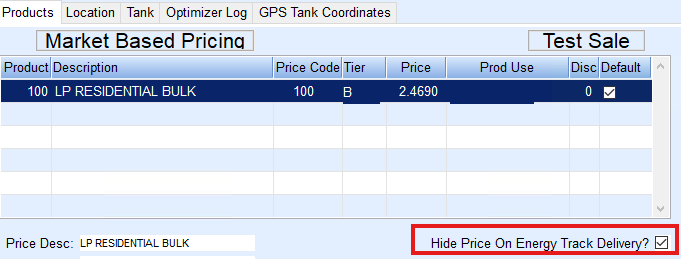
- SKYR-260 / Restrict Pricing Detail on Delivery Ticket Printout – Energy Track has the ability to hide the price on a Delivery Ticket. This is handled at the Tank level within Energy Force. Located at Customer Menu / Customer Maintenance / Tank Information. Check the Hide Price on Energy Track Delivery? box in the lower right corner of the Products tab, this will apply to all products listed on the tank.
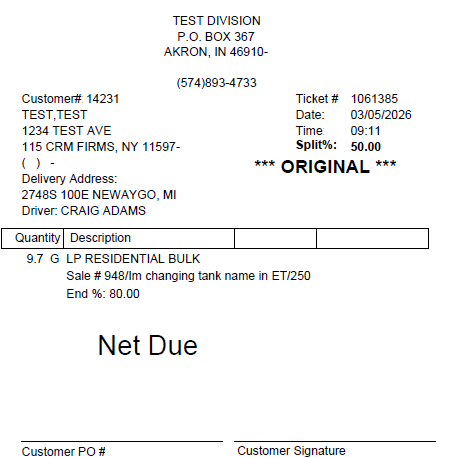
 The Price per Gallon, Taxes and Totals will not display on the Invoice, but they will be priced in the History. For a multi-delivery, if any tank is marked to Hide the Price on Energy Track Delivery?, then all deliveries on the Invoice will be hidden. When a split is used on a tank and marked to Hide the Price on Energy Track Delivery?, then all Invoices for the split will hide the pricing details. This does not apply to manually entered Invoices. Here is an example of the Invoice with the price hidden.
 - When/Where – Only the Ticket\Invoice from Energy Track and the PDF of the Energy Track Ticket\Invoice will hide the pricing. Reprinting from anywhere else in Energy Force will display the price.
- Action Needed– A new download to Energy Track is required for this feature to be used.
- SKYR-1213 / Splits Checkbox on Invoice Screen – Splits checkbox can be checked and unchecked without issue on Energy Track Invoice screen.
- Action Needed – No action required.