Energy Force
- SKYR-64 / Additional Fields on Safety Forms – Safety Forms now include Customer Type, Delivery Type and Co Owns when printed. Also, a Description field has been added when the Entry Method of Other is selected, this new field displays on the printed form as well.
- SKYR-829 / Attaching Images in EnergyImage – Energy-Image captures the correct image when multiple users are attaching images at the same time.
- SKYR-867 / Monitor Warning on Tank Transfer – Transferring, inactivating or picking up tanks will display a notification if there is an active monitor\meter attached, eliminating monitors or meters left on inactive tanks.
Company owned tanks will receive this message if CT (Customer Transfer action) or PU (Pick Up) is selected under Change Inv Status. Selecting Yes to transfer an attached monitor once the pickup or transfer of the tank is complete displays the Change Inventory Status box for the monitor or meter. When No is selected the Change Tank Inventory Status box will close.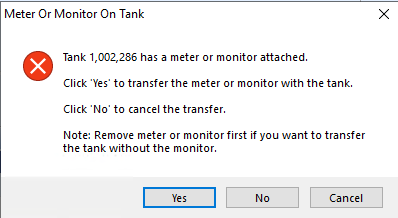 Customer owned tanks will display this message to let them know that the monitor or meter needs to be removed before inactivating or transferring the tank.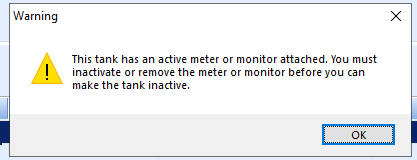
- SKYR-1052 / Daily Tank Export – Daily Tank Export will now only export new modified tanks and no longer asks users if they wish to export all tanks or only new and modified tanks. If there is a need to export all tanks, the Last Run Date log entry for TankExp can be removed and then all tanks will export.
- SKYR-1075 / Additional Tank Details on Tank Export – State, Zip Code and GPS Tank Coordinates have been added to the Tank Export and Import Process.
 Customer owned tanks will display this message to let them know that the monitor or meter needs to be removed before inactivating or transferring the tank.
EnergyTrack
- SKYR-702 / Cylinder Load/Unload Trip Report – Cylinder quantities are correct on trip report regardless of how many copies are printed.
- SKYR-931 / Invoice Text Override System Setting – A new auto generated system setting Category of Invoice and Setting Name of InvoiceTextOverride has been added and defaults to N. This setting changes the wording on delivery documents from Invoice to Ticket. When deliveries are imported to Agvance a new invoice number is assigned to the sale, this change will help clarify to customers that it is not the Invoice number.
- SKYR-1073 / Adding Items on Invoice with a Split – Adding an item to an Energy Track ticket with a split tank does not clear out the price on the fuel delivery.