Why is a customer’s tank not routing?
- Check the following items in the tank file:
- Is the tank active?
- Is the tank flagged as a P for Propane?
- Is the tank on hold?
- Has the tank been geo-coded properly? (look on your map)
- Does the tank have a valid Tank Capacity size?
- Is the tank a keep full tank delivery type 2? What is the percentage and k-factor?
- Is the tank a Julian schedule? What is the next Julian delivery date in the tank file?
- What are the parameters set to in the OptimizerPlus+ Parameter table for days before/after?
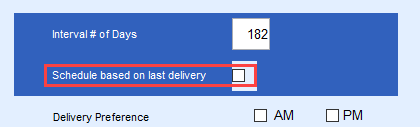
- The OptimizerPlus+ will only schedule a Julian on its specific Julian date if it is not checked to be based on the last delivery date.
- Is the tank a Will Call delivery type?
- What are the parameters set to in the OptimizerPlus+ Parameter table for days before/after?
- Is the route considered over-capacity? The OptimizerPlus+ might drop the will call tank to accommodate a keep full tank if an over capacity situation arises.
- If the Will Call must route, flag it as an immediate fill and re-run the OptimizerPlus+ schedules.
- Is the tank RRN in the OptimizerPlus+ exclusion table? These are tanks that will never route.
Why is a tank at a higher percentage routing before one with a lower percentage?
- What is the size of the tank?
- A 250 gallon tank at 30% with a low k-factor and daily usage is far more critical than a 1000 gallon tank at 20% and a higher k-factor. The OptimizerPlus+ handles predictions, not only based on percent left, but the k-factor, daily use and the weather temperatures for the next several days.
- Is there an immediate fill will call that is “driving” the route and forcing the OptimizerPlus+ to drop a keep full in a different area of the route?
- The Immediate Fill Call In is the driving force for the schedule that day and if a tank on the schedule today was not delivered to, it may not be able to route tomorrow based on where the Immediate fill call in is located.
Why does the same tank appear on my route every day?
- Did the driver deliver to the correct tank if the customer has more than 1 tank?
Example: a Call In was ordered for the shop tank, and the driver delivered the home tank. Therefore the Call In screen is not cleared and will route again to the same tank. - Did the driver communicate the handheld at the end of the shift and the deliveries posted into Energy Force before a new OptimizerPlus+ Schedule is ran? If not, it will schedule some of the same tanks again.
- If the driver does not deliver to a tank that the OptimizerPlus+ has routed due to the fact that the tank percentage was higher than anticipated, the driver needs to perform a % update on the tank so that it will remove itself from the schedule. If the driver does not perform the % update, then it will route again over the next few days, not necessarily the very next day.
Why is my route suddenly considered to be Over-Capacity?
- At times, an over-capacity situation can happen due to weekend deliveries that were scheduled by the OptimizerPlus+ that will not be delivered until Monday. Remember that from Friday morning until Monday morning, tanks could become critical during that time frame, especially if tanks have not been delivered as previously scheduled.
- A buildup of critical tanks from the weekend shows up on Mondays. In this case (and probably in general) there are mostly call-ins which came up critical during the weekend and on Monday. Set the OptimizerPlus+ parameters to schedule a Call In becoming critical on a Saturday to schedule on Friday, and if critical on Sunday, schedule on Monday.
- Is the driver driving the route? It is crucial in the winter months that the driver is compliant with what the OptimizerPlus+ is scheduling. It is not always a perfect world, however the emails received each morning display how many tanks on today’s route have already been on a prior schedule this week. This is an indicator that the routes are not compliant. If the same tanks every day on a route consistently show, either the driver needs help in that area, or the driver is not driving the routes. Therefore, it will catch up put the route in overcapacity mode taking more time to get caught up again.
- Driver Compliancy reports can be found in the Optimizer Maintenance menu.
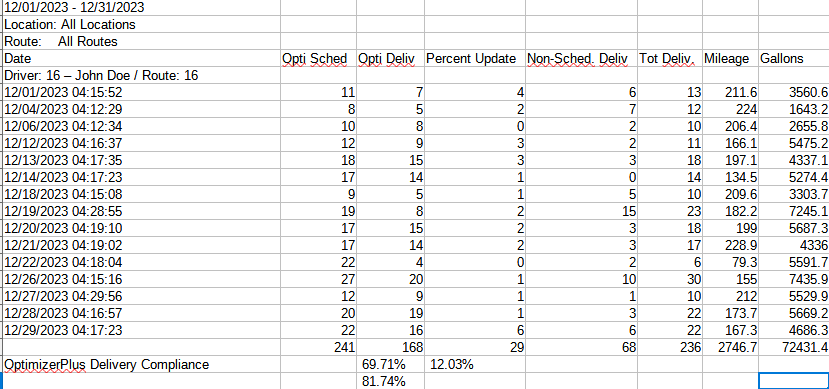 This example shows of 4 days the OptimizerPlus+ scheduled 59 tanks to deliver to, the driver delivered to 26 + did 13 % updates = 39 tanks. Therefore 59-39 = 20 tanks that were not delivered to and if the pattern continues, overcapacities and non-efficient routes will occur. If any of the 20 tanks become critical, whether they are date orientated by Julian or call in dates, or a k-factor tanks that hits the lower threshold, it will keep sending the driver back into the same areas until they are delivered, or % updated. It is also showing 21 non-schedule deliveries.
 - The OptimizerPlus+ Detail Compliance report will display who the 21 deliveries were, the tank size, and the gallons delivered.
Example: If it shows a 500 gal tank and 220 gallons were delivered, the customer really did not need a delivery yet. It also shows the delivery type, to know if the unscheduled delivery was a call in, Julian, or keep full account. There may be good reasons for non-scheduled deliveries such as – a blizzard is coming and the driver knows to get these tanks or will not be able to get up the customer's driveway. Monitor these reports daily or weekly, at the time it is happening rather than waiting until month end. - If seeing a high volume of % updates, this is indicative that the k-factors are not correct, or Julian schedules are not accurate.
- Strive to have compliancy 80% or higher as much as possible.
- Driver Compliancy reports can be found in the Optimizer Maintenance menu.
 This example shows of 4 days the OptimizerPlus+ scheduled 59 tanks to deliver to, the driver delivered to 26 + did 13 % updates = 39 tanks. Therefore 59-39 = 20 tanks that were not delivered to and if the pattern continues, overcapacities and non-efficient routes will occur. If any of the 20 tanks become critical, whether they are date orientated by Julian or call in dates, or a k-factor tanks that hits the lower threshold, it will keep sending the driver back into the same areas until they are delivered, or % updated. It is also showing 21 non-schedule deliveries.
What are some helpful tips?
At the time of the route study, certain settings such as tank thresholds (upper limit and lower limit for tank percentages) were set in the parameter tables. Do not make an adjustment to the threshold settings without first checking with Energy Force, as modifying this parameter can lead to undesirable routes or worse, could crash the OptimizerPlus+ and not allow it to run. The OptimizerPlus+ requires at least a 10% spread between the upper and lower limit thresholds in order to create a valid and efficient schedule.
In addition to thresholds, if any changes need to be made to the OptimizerPlus+ Maintenance tables, we ask that you contact support@energyforce.net for assistance, as there may be multiple tables that will need to be changed so that all of the items link together properly. Train inter-office personnel to plot tanks or geo code tanks when a new tank is assigned to a customer. Without the geo-code in place, the tank will never route in the system. Review your Tanks Not Plotted report weekly. If the tank is not plotted, this will create a run-out.
Run the Tanks On Hold report often to assure that a customer tank is not on the verge of a run out. The OptimizerPlus+ will not route a tank that is on hold. The below report is located under Tank Reports, report # 10 Tanks on Hold. This allows a %, such as 30%, to be entered to see all tanks on hold that are 30% or below allowing time to work these tanks before running out and are not on schedule.

If a truck has been Parked, but it is preferable that the driver have a route for the day, set a call in to an Immediate Fill and run the OptimizerPlus+ schedule again to generate a route in the area of the Call In tank. In an overcapacity situation, generate an additional route for a driver to help catch-up.

Go to the Route Scheduling Menu and select Populate Optimizer. Enter the route number and select No for Clear Scheduled. This will generate an additional route with new tanks to be delivered to.
Many times a call is received stating the OptimizerPlus+ let a tank run out. OptimizerPlus+ does not create a run out, the data or driver controls these situations if it is a keep full account. Either the k-factor is wrong, daily use is non-existent or incorrect, or the driver is not filling the tanks the first time they are on the route schedules.
A new Optimizer Log tab is in the customer tank screen for clients that are now on version #15 that displays the date Scheduled, Est % Left, Temp Ticket # (if delivered) and Gallons Delivered for the last 6 months. This is a quick way to determine when the customer was scheduled and when they were actually delivered.

There is also a Multi-Day Schedules report available with this same information but based by date range and not customer specific.
Example: Judy Wood was scheduled 2 days in a row before being delivered to.
Useful Management OptimizerPlus+ Reports
Summary Report
The first screen shot below shows the driver was scheduled for 12 deliveries. 11 pumpable fuel deliveries were made and determined that one tank did not need a fill and performed a % update. Combined, the driver is 100% compliant with his schedule and is EXACTLY what we want to see! The driver also picked up 2 deliveries that were not assigned to his schedule for the day. The OptimizerPlus+ scheduled him for a total of 105.5 miles and 3867.9 gallons.

Detail Report
The screen below is a break-down of those deliveries. Had the driver not delivered to a tank scheduled by the OptimizerPlus+, the manager could request that this report be run so that an explanation could be entered as to why the delivery was not made. This also shows the manager if the driver was compliant with how the OptimizerPlus+ scheduled the deliveries. The Opti tickets should be in chronological order. Customer 24676 should have been the second to the last delivery for the OptimizerPlus+ but the ticket number is the first in sequence number meaning the driver delivered to it first for some reason. The driver may have started at a different location that day rather than at the assigned yard or, the tank is geo-coded improperly. This is what the manager needs to review.

Mileage
Mileage will also increase if the drivers are not driving the schedules. Every day is not expected to be perfect with the drivers. Monitoring trends to see what is happening and get it corrected before seeing the over capacities or the run-outs created by not driving the schedules, or being below 80% compliant.
Why does OptimizerPlus+ send me back to the same delivery area?
Example: A route with and without the OptimizerPlus+ as discussed during the F.A.Q.’s above.
